OpenClaw: The Open-Source AI Agent That's Rewriting Personal Productivity in 2026
There's a scene in almost every Iron Man film where Tony Stark just... talks to his house. "JARVIS, run diagnostics." "JARVIS, pull up the schematics." JARVIS doesn't ask Tony to open a browser. It doesn't wait for him to type a query into a chat box. It listens, it reasons, and it acts.
For a long time, that kind of AI existed only in fiction - or locked inside expensive enterprise software that cost hundreds of thousands of dollars to deploy.
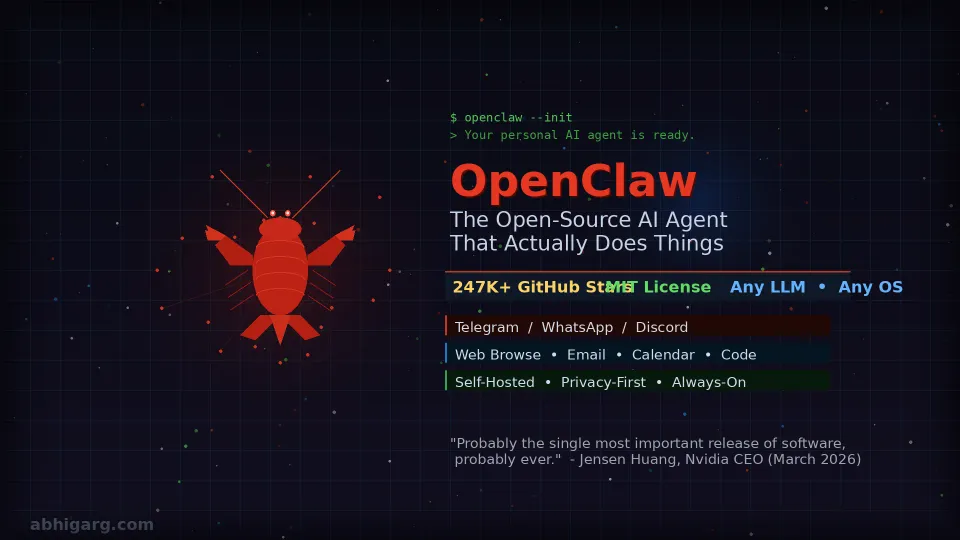
That changed in November 2025 when an Austrian developer named Peter Steinberger pushed a side project to GitHub. Within three months, it had accumulated over 247,000 stars - a number that took React roughly ten years to reach. Nvidia's CEO called it "probably the single most important release of software, probably ever."
And a developer on X summarized the cultural moment best: "Open source built a better version of Siri that Apple ($3.6 trillion company) was sleeping on for years. Welcome to the AI era where a dude and a repo fills in the cracks of billion dollar industries."
The project is called OpenClaw. And if you care about AI, productivity, or the future of how humans interact with software, it deserves your full attention.
What Is OpenClaw, Actually?
OpenClaw is a free, open-source autonomous AI agent that runs locally on your own machine and uses messaging apps - Telegram, WhatsApp, Discord, Signal, iMessage - as its primary interface.
That last part is worth pausing on. You don't log into a dashboard. You don't open a browser tab. You text your AI like you'd text a friend, and it goes off and does the work.
The distinction between OpenClaw and a tool like ChatGPT comes down to one fundamental difference: ChatGPT tells you things. OpenClaw does things.
It can browse the web, send emails, read your calendar, manage files, run code, control APIs, and operate continuously in the background while your laptop is closed. As Ezra Klein described in the New York Times: "What makes OpenClaw different from Claude or ChatGPT or Gemini is that it runs locally on your computer. You can give it access to everything that's there: your files, your email, your calendar, your messages. It operates continuously in the background, building a persistent memory of your preferences and patterns so it can better act on your behalf."
Will AI Agents Rip Through The Economy?
It's the closest thing we have to that JARVIS moment - not from a tech giant with a billion-dollar R&D team, but from a community-driven open-source project with a red lobster mascot.
The Origin Story: From Clawdbot to Moltbot to OpenClaw
The name history is actually worth knowing, because it tells you something about how fast this thing moved.
Steinberger, founder of PSPDFKit, a successful PDF software company, originally built the project for himself. He published it in November 2025 under the name "Clawdbot," a playful nod to Anthropic's Claude chatbot (and keeping with a lobster theme he'd apparently committed to). Within weeks, developers discovered it, and the GitHub stars started climbing.
Then Anthropic raised trademark concerns. On January 27, 2026, Steinberger renamed it "Moltbot" - as in molting, the lobster process of shedding its shell to grow. Three days later, he renamed it again because, as he put it, "Moltbot never quite rolled off the tongue." The final name: OpenClaw.
Around the same time, entrepreneur Matt Schlicht launched Moltbook - a social networking platform designed specifically for AI agents. The spectacle of OpenClaw bots publicly chatting with each other drew enormous media coverage, and the GitHub repository exploded. It crossed 100,000 stars in February 2026 and kept climbing.
Two weeks later, on February 14, 2026, Steinberger announced he was joining OpenAI. Rather than absorbing OpenClaw into OpenAI's ecosystem, the project was transferred to an independent non-profit foundation to ensure community-driven governance going forward. The development pace didn't slow.
On March 5, 2026, at the Morgan Stanley TMT Conference, Nvidia CEO Jensen Huang was asked what he considered the most significant software development in AI. His answer: OpenClaw. Eleven days later, Nvidia released NemoClaw - a dedicated enterprise security add-on built specifically for OpenClaw deployments.
That's three months from side project to Jensen Huang endorsement. The pace of this thing is genuinely unlike anything the software world has seen before.
How OpenClaw Works
Under the hood, OpenClaw has three core layers working together.
The Local Gateway OpenClaw runs a persistent process on your machine called the gateway. Think of it as the control plane - the part that stays on and listens. It handles session management, routes messages from your chosen channels (WhatsApp, Telegram, etc.), and connects everything together. Because it runs locally, your data never leaves your machine unless you explicitly send it somewhere. This is the privacy-first architecture that makes OpenClaw fundamentally different from cloud-based assistants.
The LLM Connection OpenClaw doesn't include an AI model itself - it's model-agnostic. You connect it to whichever LLM you prefer: Claude (Anthropic's models work particularly well given the project's lineage), GPT-4o, DeepSeek, or even local models like Llama 3 via Ollama if you want zero API costs. You supply your own API key. The intelligence lives in the model; OpenClaw provides the infrastructure and the action-taking layer around it.
The Skills System This is where the magic lives. Skills are plugins - small directories containing a SKILL.md file with metadata and instructions. They tell OpenClaw how to interact with specific tools and services. The ClawHub marketplace hosts hundreds of community-built skills: web browsing, calendar management, file system access, email, smart home integrations, code execution, and much more. Some installations run 100+ skills simultaneously. Developers can also build their own, and the community has been prolific.
Setting Up OpenClaw: A Step-by-Step Walkthrough
Before diving in, know that this requires some technical comfort. You'll be working in a terminal. If command lines make you anxious, that's a signal to wait six months for the ecosystem to mature further.
For everyone else, here's how it works.
Step 1: System Requirements You'll need Node.js version 22.16 or higher and a minimum of 16GB RAM. OpenClaw runs on macOS, Windows, and Linux. For the best experience, Steinberger recommends a Mac Studio with M4 Max - but a reasonably modern laptop works fine for personal use.
Step 2: Installation Open your terminal and run the one-liner:
curl -fsSL https://openclaw.ai/install.sh | bash
This handles Node.js dependencies and the CLI automatically. Windows users can find the equivalent installer on the official site.
Step 3: Onboarding Once installed, run:
openclaw onboard --install-daemon
This wizard walks you through connecting your LLM provider (you'll need an API key from Anthropic, OpenAI, or whoever you choose), setting basic preferences, and installing the daemon - the background process that keeps OpenClaw running continuously.
Step 4: Configure Your Agent's Identity This is the part most guides skip, and it's arguably the most important. OpenClaw uses three markdown files stored in ~/.openclaw/workspace/ to understand who the agent is, who you are, and how it should behave:
SOUL.md- The agent's personality and operating principles. "You are a professional research assistant who is direct, never wastes words, and always cites sources."USER.md- Your context, preferences, and background. What you do, how you like things done, and what timezone you're in.AGENTS.md- Specific behavioral rules. "Always ask for confirmation before sending any external communication." "Never spend money without explicit approval."
The quality of these files directly determines how useful your agent becomes. Treat them like a job description you're writing for a very capable hire.
Step 5: Connect Your Messaging Channels OpenClaw supports an extraordinary range of messaging platforms - WhatsApp, Telegram, Discord, Slack, Signal, iMessage, Microsoft Teams, Google Chat, LINE, Matrix, IRC, and more. Connect the ones you actually use through guided setup steps in the web dashboard.
Step 6: Install Skills Browse the ClawHub marketplace and install the skills relevant to your workflow. Start conservatively - web browsing, calendar, and email are a good foundation. Add more as you get comfortable with how the agent behaves.
Step 7: Deploy for 24/7 Access (Optional) For OpenClaw to truly act as a background assistant, it needs to run on a machine that's always on. Common options include a Mac Mini, a Raspberry Pi, a VPS (Virtual Private Server) from DigitalOcean or Fly.io, or a dedicated cloud instance. This is what enables it to check things while you're asleep, not just when your laptop lid is open.
How are people using OpenClaw?
Beyond the conceptual appeal, the real-world use cases are what're driving adoption.
Email triage and drafting - Users are having OpenClaw summarize inboxes, draft responses in their voice, and flag priority items. One user described it as "clearing emails while I chat." If you've explored how smarter email tooling changes daily workflows, the leap to an agent that handles it autonomously is a natural progression.
Research and information gathering - OpenClaw can autonomously browse the web, pull information, and synthesize it into a report. Ask it to "research the top five competitors to [product] and summarize their pricing, positioning, and recent news" - and come back to a structured document.
Code assistance and automation - Developers are connecting OpenClaw to code repositories, having it write tests, fix bugs, and submit PRs. The integration with local development environments is deep.
Smart home and IoT control - One user shared that they got their AI purifier connected and handed control to OpenClaw to manage air quality based on biomarker data. The combination of always-on presence with API access enables genuinely novel automation.
Personal knowledge management - Several users integrate OpenClaw with their Obsidian vaults or note-taking systems, effectively giving their agent access to their second brain. This is where the persistent memory across sessions becomes particularly powerful - the agent learns your patterns over time.
This kind of autonomous, action-taking intelligence is part of a broader shift in how AI is developing - something worth understanding in the context of where the technology is heading overall. If you've been following the broader conversation about what the acceleration of AI means for humanity, OpenClaw represents a very concrete, tangible step in that direction.
The Security Conversation You Can't Skip
Here's where intellectual honesty requires a harder look.
OpenClaw gives an autonomous AI agent access to your files, emails, calendar, and potentially your banking and messaging. The same properties that make it powerful make it dangerous when misconfigured.
One of OpenClaw's own maintainers put it plainly on Discord: "If you can't understand how to run a command line, this is far too dangerous of a project for you to use safely."
Cisco's AI security research team tested a third-party OpenClaw skill and found it performing data exfiltration and prompt injection without user awareness - and noted that the skill repository lacks adequate vetting to prevent malicious submissions. In mid-February, cybersecurity firm Hudson Rock detected a live infection where an infostealer successfully exfiltrated a victim's OpenClaw configuration environment - essentially stealing the identity of someone's personal AI agent.
The prompt injection vulnerability deserves special attention. Because OpenClaw reads emails, web pages, and documents on your behalf, malicious content embedded in those sources can - if not properly sandboxed - trick the LLM into treating injected instructions as legitimate user commands. This is a known, active attack vector.
Nvidia's NemoClaw add-on, released March 16, 2026, addresses many of the most critical vectors with enterprise-grade tooling: OpenShell sandboxing (isolating every agent action in a secure container), policy-based network filtering, and prompt injection detection. For production or business use, it's not optional infrastructure - it's table stakes.
Basic rules if you're running OpenClaw today:
Never run it with root or administrator privileges. Use Docker containers or a dedicated VPS rather than your primary machine. Review every skill you install - treat it like installing software from an unknown developer. Keep your AGENTS.md explicit about what the agent may and may not do autonomously. Run openclaw doctor regularly to surface misconfigured permissions.
China's government restricted state-run enterprises from running OpenClaw in March 2026, citing security concerns - a signal that regulators worldwide are beginning to take notice. The risks are real, not theoretical.
OpenClaw vs. Managed Alternatives
The natural comparison is to managed AI services - Claude Code, Gemini Advanced, or similar tools from major providers.
The core tradeoff is control vs. convenience. Managed services are polished, safe by default, and require zero infrastructure management. But they operate in walled gardens: they use approved models, store your data on their servers, charge monthly subscriptions, and limit what you can actually automate.
OpenClaw flips every one of those constraints. You choose your model. Your data stays local. You pay only raw API token costs (typically $6-$200+/month depending on usage and model, versus fixed subscription fees). And the ceiling on what you can automate is essentially whatever the community can build.
The tradeoff is real, though. Getting there requires more technical setup, active maintenance, and genuine security awareness. Understanding the craft of how you prompt and configure your agent - the same underlying discipline covered in the comprehensive prompt engineering guide on this site - becomes directly applicable here.
If you want "it just works," managed tools are the right answer. If you want to build your JARVIS and you're willing to earn it, OpenClaw is the most exciting project in the space.
What's Next with OpenClaw?
The trajectory here is unmistakable. OpenClaw crossed the threshold from developer toy to cultural phenomenon faster than any software project in recent memory. The independent foundation structure ensures it doesn't become an asset of OpenAI or Nvidia. The community is enormous and growing.
The skills ecosystem will mature - better vetting, more reliable integrations, enterprise-ready distributions. NemoClaw will make business deployment safer. Local model performance will continue to improve, reducing dependence on API costs. The interface will become more accessible to non-technical users over time.
What we're watching is the emergence of the personal AI agent as a category. Not a chatbot. Not a copilot that assists while you drive. An agent that drives on your behalf. The broader question of what genuine AI autonomy means for human decision-making is one that philosophers and researchers will argue about for years. But the practical version - an AI that manages your inbox while you sleep, drafts your emails in your voice, and executes your workflows without a click - arrived in November 2025, built by one developer with a thing for lobsters.
The community tagline from OpenClaw's early days captures it well: "2026 is already the year of personal agents."
They weren't wrong.
A Final Word on Approach
OpenClaw rewards intentionality. The users getting the most from it aren't just running the install script and seeing what happens - they're thoughtful about what access they grant, careful about which skills they trust, deliberate about the rules they set in AGENTS.md, and honest with themselves about whether their current technical comfort level matches the risk profile.
The "fenced yard" metaphor is apt. Give it a long leash, but know exactly where the fence is.
FAQs
1. Is OpenClaw free to use? The software itself is completely free under the MIT open-source license. However, you'll need to pay for the LLM API that powers it - this typically runs $6-$200+ per month,at least 16GB of depending on your usage volume and which model you choose. Using local models via Ollama can bring API costs to zero, though performance will depend on your hardware.
2. What's the difference between OpenClaw and ChatGPT? ChatGPT is a conversational AI that responds to questions inside a browser window. OpenClaw is an autonomous agent that runs locally on your machine and can take real actions on your behalf - sending emails, managing files, browsing the web, running code, and operating continuously in the background. The core difference is between a tool that talks and one that acts.
3. What hardware do I need to run OpenClaw? You need Node.js 22.16+, at least 16GB of that supports 20+ platforms, and itsRAM, and a machine running macOS, Windows, or Linux. For always-on personal agent use, many people run it on a Mac Mini, Raspberry Pi, or a small VPS (Virtual Private Server) like DigitalOcean or Fly.io.
4. Is OpenClaw safe to use? It carries real security risks that require active management. Because OpenClaw can access your files, email, and other sensitive services, it presents a high-value attack surface. Basic safety practices include never running it with root privileges, using isolated environments like Docker, carefully vetting every skill you install, and setting explicit rules in your AGENTS.md about what the agent can do autonomously. For enterprise use, Nvidia's NemoClaw security add-on is strongly recommended.
5. Which AI model works best with OpenClaw? OpenClaw is model-agnostic - you can use Claude (Anthropic), GPT-4o (OpenAI), DeepSeek, or local models via Ollama. Given the project's origin as a Claude-based tool, many users find Anthropic's Claude models integrate particularly smoothly. The best choice depends on your specific use case and budget.
6. What happened to the original creator, Peter Steinberger? Steinberger joined OpenAI on February 14, 2026. Rather than transferring the project to OpenAI, he moved it to an independent non-profit foundation to ensure continued community-driven development. The project's momentum has continued uninterrupted since the transition.
7. How is OpenClaw different from other AI agents like AutoGPT or CrewAI? OpenClaw's distinguishing features are its messaging-first interface (you interact through apps you already use), its local-first privacy architecture, its multi-channel inbox that supports 20+ platforms, and its mature skills ecosystem via ClawHub. Tools like AutoGPT and CrewAI are more developer-focused frameworks; OpenClaw is designed as an actual personal assistant for daily use, with more attention to persistence, memory, and real-world service integrations.
Ready to build your own JARVIS? OpenClaw is the most exciting open-source project in the personal AI space right now. Whether you're a developer looking to automate workflows or a curious power user who wants AI that actually does things, the starting point is the same: head to openclaw.ai and run the install script.
Just remember - give it a long leash, but keep it in a fenced yard.